Working from home has become the norm for millions of people worldwide. Creating a workspace that supports both your health and productivity is essential for long-term success. An adjustable desk offers flexibility that traditional furniture simply cannot match, allowing you to alternate between sitting and standing throughout your workday.
However, simply purchasing an adjustable desk isn’t enough. Proper setup and configuration make the difference between a workspace that energizes you and one that causes discomfort. Understanding how to position your desk, arrange your equipment, and develop healthy habits will transform your home office into a productivity powerhouse.
This comprehensive guide will walk you through every aspect of setting up your adjustable desk correctly. You’ll discover how to find the perfect heights for both sitting and standing positions, arrange your equipment for optimal comfort, and build routines that keep you energized throughout the day.
Understanding the Benefits of Height Adjustment
Before diving into setup details, it’s worth understanding why adjustable desks have become so popular. Movement throughout the day keeps your body engaged and prevents the health issues associated with prolonged sitting.
Research shows that sitting for extended periods contributes to back pain, poor circulation, and decreased energy levels. Standing burns more calories and improves blood flow, leading to better focus and reduced fatigue. However, standing all day creates its own problems, including leg fatigue and foot discomfort.
Therefore, the ability to switch between positions gives you the best of both worlds. You maintain energy and comfort by changing positions before discomfort sets in. This flexibility is what makes an ergonomic desk setup so valuable for home workers.
Choosing the Right Location for Your Desk
Your desk’s location in your home office affects both productivity and comfort. Several factors should influence where you place your adjustable workstation.
Natural light improves mood and reduces eye strain, making window proximity desirable. However, avoid positioning your desk so that sunlight creates glare on your screen. Place your desk perpendicular to windows rather than directly facing them or having them behind you.
Additionally, consider room traffic patterns. Your workspace should feel separate from household activity, even in shared spaces. Position your desk away from doorways and high-traffic areas to minimize distractions.
Power outlet accessibility is crucial for adjustable desks, which require electricity to operate. Ensure you can reach outlets without creating tripping hazards from extension cords. Some desks include built-in cable management that helps keep cords organized and out of the way.
Finding Your Perfect Sitting Height
Proper sitting height forms the foundation of a comfortable sit stand workstation. Getting this measurement right prevents strain and supports good posture throughout the day.
Start by adjusting your desk so your elbows form a 90-degree angle when your hands rest on the keyboard. Your forearms should be roughly parallel to the floor. This position keeps your shoulders relaxed and prevents tension in your neck and upper back.
Your feet should rest flat on the floor or on a footrest. If your desk height forces you to dangle your feet, you’ll experience circulation problems and lower back discomfort. Conversely, if your knees are significantly higher than your hips, your thighs won’t be properly supported.
The monitor distance and height deserve equal attention. Your screen should sit about an arm’s length away, with the top of the display at or slightly below eye level. This position prevents you from tilting your head up or down, which strains neck muscles.
Test your setup by sitting for a few minutes and paying attention to any tension or discomfort. Make small adjustments until everything feels natural and comfortable. Remember that comfort shouldn’t require conscious effort to maintain.
Determining Your Ideal Standing Height
Standing height requires different measurements than sitting, though the principles remain similar. A proper standing position keeps your body aligned and prevents fatigue.
When standing, your desk should still allow your elbows to rest at approximately 90 degrees with your forearms parallel to the floor. However, many people need to adjust this slightly higher when standing compared to sitting.
Your monitor height becomes even more critical when standing. The top of your screen should align with your eye level or slightly below. Standing tends to make people look down more than when sitting, so you may need to raise your monitor compared to its sitting position.
Weight distribution matters significantly in standing position. Stand with your feet hip-width apart and your weight evenly distributed. Avoid locking your knees, which reduces circulation and causes fatigue. Keep a slight bend in your knees to maintain comfort.
Consider using an anti-fatigue mat when standing. These cushioned mats reduce stress on your feet, legs, and lower back. The subtle instability of quality mats also encourages small movements that improve circulation.
Arranging Your Equipment for Maximum Efficiency
Beyond desk height, how you arrange your equipment affects both comfort and productivity. Smart placement reduces reaching, twisting, and eye strain.
Your keyboard and mouse should be close enough that you don’t need to reach forward. Keep them centered in front of you to avoid twisting your torso. If you use a laptop, consider an external keyboard and mouse to achieve proper positioning.
The mouse should sit at the same height as your keyboard. Reaching up or down to use your mouse creates shoulder tension over time. Keep your mouse close to your keyboard so you don’t need to extend your arm fully to reach it.
Multiple monitors require careful arrangement. Position your primary monitor directly in front of you, with secondary screens angled slightly to the side. If you use both monitors equally, place them side by side with their edges meeting at your centerline.
Frequently used items should be within easy reach. Your phone, notepad, or other tools you use regularly should be accessible without stretching or straining. Items used occasionally can be placed further away, giving you a reason to move periodically.
Creating Height Presets for Quick Transitions
Most modern adjustable desks include programmable height presets. Taking time to set these properly makes transitioning between positions effortless and encourages you to change positions regularly.
Program your first preset to your ideal sitting height. Test this height thoroughly over several days, making minor adjustments until it feels perfect. Once established, save this setting so you can return to it instantly.
Your second preset should reflect your optimal standing height. Again, test and refine this measurement over time. Small differences in footwear or fatigue levels might require occasional tweaking.
Some desks offer additional presets that you can use for specific tasks. For example, you might have a slightly lower sitting position for focused keyboard work and a higher standing position for video calls or collaborative tasks.
Clearly label your presets if your desk doesn’t automatically indicate them. This simple step prevents confusion and makes it easy for others to use your desk if needed. Additionally, document your exact height measurements in case you need to reprogram presets after a power outage or desk reset.

Building Healthy Transition Habits
Owning an adjustable desk provides opportunity, but developing good habits delivers results. Creating a routine for position changes ensures you actually benefit from your sit stand workstation’s flexibility.
Start gradually if you’re new to standing while working. Begin with 15 to 20 minutes of standing per hour, then slowly increase duration as your body adapts. Jumping immediately to several hours of standing can cause fatigue and discourage continued use.
Set reminders to change positions. Your phone, computer, or even a simple timer can prompt you to transition. Many people find that standing for specific tasks, like phone calls or video meetings, creates natural transition points.
However, listen to your body rather than following rigid schedules. Some days you might feel energized and stand more, while other days call for more sitting. The key is variation, not achieving a specific sitting-to-standing ratio.
Movement matters more than position. Whether sitting or standing, incorporate stretches and position shifts throughout the day. Roll your shoulders, stretch your neck, or take brief walking breaks to maintain circulation and prevent stiffness.
Managing Cables and Accessories
An organized workspace enhances both aesthetics and functionality. Cable management becomes particularly important with adjustable desks that move up and down regularly.
Use cable trays or channels to guide cords along your desk frame. These accessories prevent cables from getting tangled or caught as your desk moves. Additionally, they create a cleaner appearance that reduces visual clutter.
Leave adequate slack in all cables to accommodate height changes. Cables that are too tight will either restrict desk movement or unplug when you adjust height. Conversely, excessive slack creates tangles and looks messy.
Wireless peripherals reduce cable complexity significantly. A wireless keyboard, mouse, and headphones eliminate several cables immediately. However, remember that wireless devices require charging, so plan for that additional task.
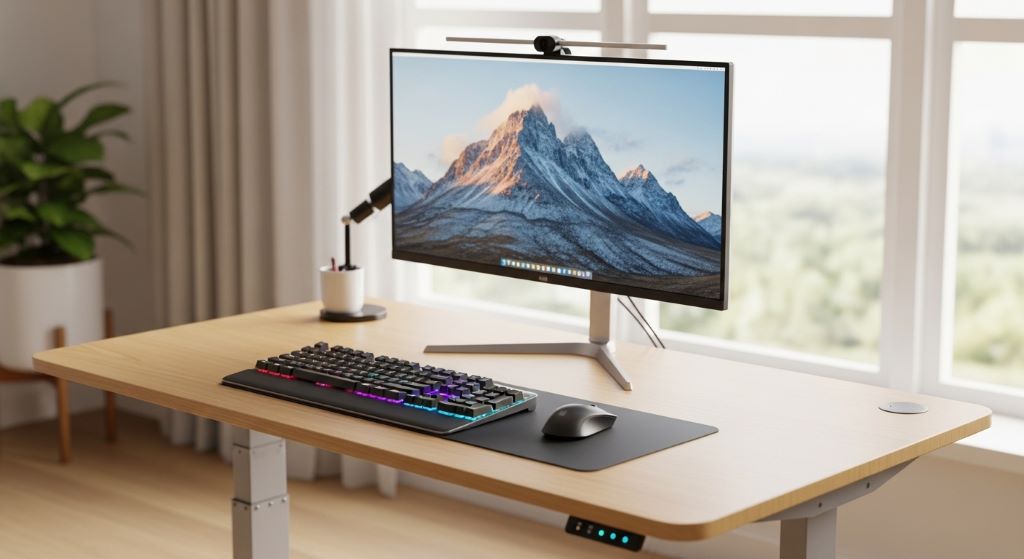
Consider a monitor arm for maximum flexibility. These arms attach to your desk and allow independent monitor positioning. You can adjust your monitor height separately from your desk, which is particularly useful when transitioning between sitting and standing.
Optimizing Lighting for Both Positions
Lighting needs change when you move between sitting and standing heights. Proper illumination reduces eye strain and supports productivity in any position.
Task lighting should be adjustable to accommodate both heights. A desk lamp with a flexible arm lets you direct light where needed regardless of your position. Position it to illuminate your work surface without creating glare on your screen.
Natural light varies throughout the day, affecting your workspace differently. Monitor how sunlight moves across your desk and adjust window coverings as needed. What works perfectly in morning light might create problems in the afternoon.
Additionally, consider the height of overhead lighting. Standing brings you closer to ceiling fixtures, which might create glare or cast unwanted shadows. Adjustable overhead lights or diffusers can solve this problem.
Screen brightness should match ambient lighting conditions. Overly bright screens strain your eyes in dim environments, while screens that are too dim cause squinting in bright conditions. Most devices include automatic brightness adjustment that helps maintain comfort.
Maintaining Your Adjustable Desk
Regular maintenance ensures your desk continues operating smoothly for years. Simple care routines prevent problems and extend your investment’s lifespan.
Keep the lifting mechanism clean and free from debris. Dust and dirt can interfere with smooth operation. Wipe down the desk frame regularly with a slightly damp cloth, paying attention to the adjustment columns.
Test the height adjustment mechanism weekly. Raise and lower your desk through its full range of motion to ensure everything operates correctly. This regular use also prevents the mechanism from becoming stiff through inactivity.
Check all cable connections periodically. Adjustable desks can gradually work cables loose through repeated movement. Ensuring everything stays connected prevents frustrating interruptions when you’re trying to work.
However, avoid overloading your desk beyond its weight capacity. Excessive weight strains the lifting mechanism and can cause premature failure. Distribute weight evenly across the surface rather than concentrating it in one area.
Personalizing Your Workspace
While ergonomics provides the framework, personalization makes your workspace truly yours. Small touches enhance motivation and make your home office a place you enjoy spending time.
Add plants to improve air quality and create a more pleasant environment. Choose low-maintenance varieties that thrive in your office’s lighting conditions. Position them where they won’t interfere with your ergonomic desk setup but remain visible and accessible.
Personal items like photos or artwork make your space feel welcoming. However, avoid cluttering your desk surface, which reduces available workspace and creates distractions. Use wall space or shelving for decorative items.
Consider adding subtle background music or white noise to improve focus. Many people find that appropriate audio masking helps them concentrate while working from home. Experiment to find what works best for your concentration style.
Therefore, create a space that balances function with personality. Your home office should support productive work while reflecting your individual preferences and style.
Conclusion
Setting up an adjustable desk properly transforms your home office into a space that supports both health and productivity. Finding the correct heights for sitting and standing positions prevents discomfort and allows you to work comfortably for extended periods.
Remember that a sit stand workstation only provides benefits if you actually use it. Developing habits around position changes and movement throughout the day maximizes the value of your investment. Start gradually and build sustainable routines that fit your work style.
Pay attention to the details that matter. Proper monitor height, keyboard positioning, and cable management contribute significantly to your overall comfort and efficiency. An ergonomic desk setup considers every element of your workspace, not just the desk itself.
Your adjustable desk is an investment in your long-term health and work performance. Taking time to configure it correctly pays dividends through increased comfort, better focus, and reduced physical strain. Enjoy the flexibility and energy that comes from a workspace designed around your needs.
Frequently Asked Questions
How often should I switch between sitting and standing?
Most experts recommend changing positions every 30 to 60 minutes. However, listen to your body rather than following rigid schedules. Start with shorter standing periods of 15 to 20 minutes if you’re new to using a standing desk. Gradually increase duration as your body adapts. The goal is regular variation throughout the day, not achieving a specific ratio.
What’s the ideal desk height for a person of average height?
For sitting, most people between 5’6″ and 5’10” find a desk height between 28 and 30 inches comfortable. For standing, this typically increases to 38 to 42 inches. However, individual proportions vary significantly, so always adjust based on the 90-degree elbow angle guideline rather than relying on standard measurements.
Do I need special shoes for standing at my desk?
You don’t need special shoes, but footwear choice affects comfort. Avoid high heels or completely flat shoes for extended standing. Supportive shoes with slight cushioning work best. Many people prefer standing in socks or barefoot on an anti-fatigue mat at home. Experiment to find what keeps you comfortable throughout the day.
Can an adjustable desk help with existing back pain?
An adjustable desk can help reduce back pain by encouraging movement and proper posture. However, it’s not a cure for existing conditions. If you have chronic back pain, consult a healthcare provider before making significant changes to your work setup. Combine your new desk with proper posture habits and regular movement for best results.
How do I prevent my desk from wobbling when raised to standing height?
Ensure your desk sits on a level surface and all feet make solid contact with the floor. Tighten any loose bolts or connections. Avoid exceeding the weight capacity, which increases instability. Higher-quality desks have less wobble at maximum height. If wobble persists, check that the lifting columns are properly aligned and undamaged.
Related Topics:
Renter-Friendly Kitchen Makeover Without Drilling: Transform Your Space Hassle-Free
How to Build a Simple Fire Pit for Your Backyard