
Imagine stepping into your bathroom, greeted not just by your reflection but by a sleek, futuristic interface that blends style with technology. The Capstone Touch Screen Smart Mirror is more than a mirror—it’s a gateway to a connected lifestyle. With its Android OS, voice command capabilities, and smartphone casting, this innovative device transforms daily routines. Whether checking the weather or streaming a workout, it’s designed for modern living. In this review, we’ll explore how this smart mirror elevates functionality, fascinates with its features, and educates us on the potential of smart home devices. Join me as I share my journey with this mirror, diving into its design, performance, and real-world applications.
What Makes the Capstone Smart Mirror Unique?
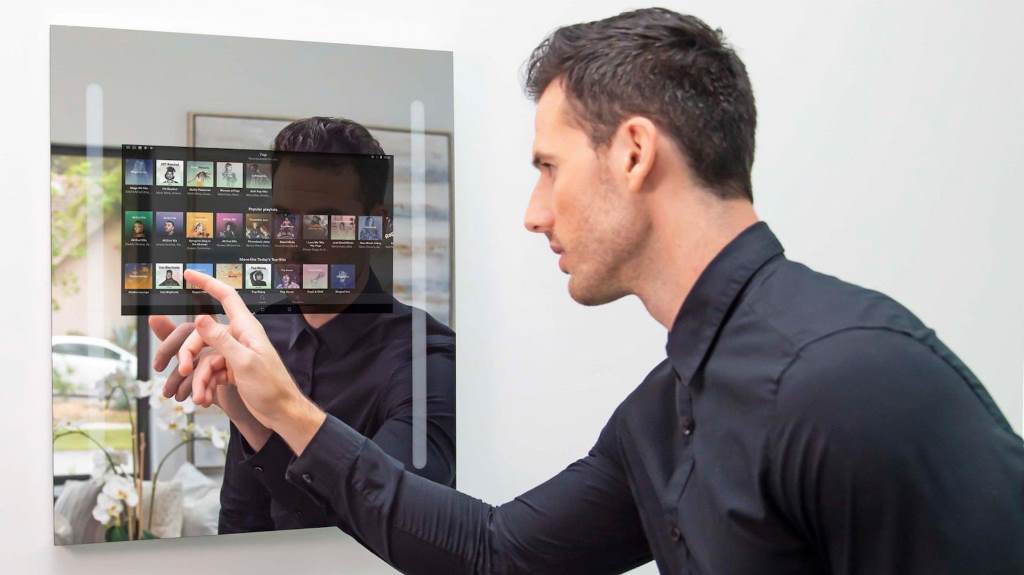
The Capstone Touch Screen Smart Mirror stands out in the crowded smart home market. Unlike a basic mirror, it’s a full-length wardrobe mirror or a standard-sized option with a hidden 18.5-inch touchscreen. Powered by Android 10, it supports internet access and app downloads, offering versatility that a traditional mirror can’t match. Its proprietary Thin Touch and Thin Cast technologies allow seamless interaction, either through direct touch or smartphone screen mirroring.
I first encountered this mirror at a friend’s home gym, where it displayed a yoga tutorial while reflecting her form. The blend of practicality and tech fascinated me. According to a 2021 Digital Trends report, Capstone’s mirrors cater to varied lifestyles, from fitness enthusiasts to busy professionals. The ability to switch between Smart 1 (touchscreen mode) and Smart 2 (casting mode) makes it a convenient mirror for multitasking. It’s not just a reflective surface—it’s a hub for productivity and entertainment.
Design and Build: Sleek Meets Functional
The Capstone Connected Smart Mirror comes in two sizes: the Standard (32.5 x 22.5 inches) and the Fitness/Lifestyle (60 x 22.5 inches). Both are 1.25 inches thick, with the larger model weighing 37 pounds, requiring sturdy wall mounting. The design is elegant, blending into any room when the screen is off, resembling a regular mirror. Four integrated speakers deliver crisp audio, enhancing its appeal for music or video streaming.
When I installed the standard model in my bathroom, the setup was straightforward, thanks to included mounting hardware. However, the weight demands a stud finder for secure installation. The mirror’s aluminum phone stand and optional power bank add portability, though the proprietary power bank limits flexibility. Its sleek design, minus the glowing Capstone logo, feels like a nod to sci-fi aesthetics, making it a conversation starter at home.
Performance: Powering Your Daily Routine
Under the hood, the Capstone Smart Mirror runs on a Qualcomm Snapdragon 665 with 4GB RAM and 32GB storage (half used out of the box). While not an iPad Pro, it handles tasks like browsing, streaming, and app navigation smoothly. The Full HD touchscreen, though subdued by the mirrored glass, is responsive in dim lighting. WiFi and Bluetooth 5.0 ensure reliable connectivity, and the USB-C port supports power options.
My experience streaming a FitOn workout was seamless, with clear audio from the speakers. However, in bright rooms, glare can obscure the display, a drawback noted in a SlashGear review. The mirror’s voice interfacing works with Siri or Google Assistant via your phone, adding hands-free convenience. For example, I checked traffic updates while brushing my teeth, saving time. It’s a practical tool for busy mornings, though heavy apps may lag due to limited processing power.
Smart Features: A Hub for Modern Living
The mirror’s Smart 1 mode lets you interact directly with preinstalled apps like Windy for weather or Pluto TV for streaming. You can download apps via APKPure, as it lacks the Google Play Store. Smart 2 mode shines with smartphone casting, letting you mirror your phone’s screen for YouTube tutorials or social media. This feature, unique to Capstone Connected Thin Cast Smart Mirror, feels revolutionary for fitness buffs or multitaskers.
I used Smart 2 to cast a cooking tutorial while preparing dinner, following steps on the mirror’s display. The mirror’s voice control, paired with my phone’s assistant, responded accurately to commands like “play workout playlist.” However, apps requiring gyroscopes don’t work, a limitation for some games. The mirror’s ability to blend internet access with daily tasks makes it a natural progression for smart homes, enhancing both functionality and style.
Pros and Cons: Weighing the Benefits
The Capstone Touch Screen Smart Mirror offers a compelling mix of features, but it’s not flawless. Here’s a breakdown to help you decide:
- Pros:
- Versatile touchscreen mirror with Android OS for app flexibility.
- Smartphone casting for seamless iOS/Android integration.
- Four integrated speakers provide quality audio without subscriptions.
- Sleek design doubles as a regular mirror when off.
- Voice assistants enhance hands-free operation.
- Cons:
- Display struggles with glare in bright rooms.
- Limited storage and processing power for heavy apps.
- Proprietary power bank restricts portability options.
My personal use highlighted the pros, especially for fitness and productivity. Yet, the glare issue was noticeable in my sunlit bathroom, requiring dimming. For its price—$799 for Standard, $999 for Fitness/Lifestyle—it’s a premium investment, but the lack of subscription fees adds value.
Practical Applications: Beyond the Mirror
The Capstone Connected ThinCast Touchscreen Smart Mirror fits various lifestyles. In a home gym, it’s ideal for following workout videos while checking form. In bathrooms, it streamlines morning routines with news, weather, or email updates. For wardrobe planning, the full-length model serves as a virtual dressing room, though it lacks advanced features like Haier’s RFID-based outfit scanning. Its voice command feature makes it accessible for all ages.
I found it invaluable during a busy week, casting my calendar to plan while getting ready. The mirror’s ability to integrate with smart home ecosystems, like Alexa, adds convenience. For families, it can serve as a dashboard, though it’s pricier than alternatives like Amazon’s Echo Show 15 ($250). Its no-subscription model, as noted on Amazon, makes it cost-effective long-term. The mirror’s versatility makes it a standout in smart home innovation.
Installation and Setup: Easy Yet Thoughtful
Setting up the Capstone Smart Mirror is user-friendly but requires attention. The box includes a wall mount, screws, and an AC adapter. A leveler and stud finder are recommended for secure installation, especially for the 37-pound Fitness model. The Android OS setup takes minutes, connecting to WiFi and pairing with your phone for casting or voice control. The user guide is clear, though I wished for more app installation tips.
My setup took 30 minutes, with the aluminum phone stand simplifying casting. The proprietary OS, while limiting, ensures a clean interface without bloatware. For those less tech-savvy, Capstone’s USA-based support (1-888-570-8889) is a plus. However, the mirror’s weight and power bank exclusivity demand careful planning. Once installed, it blends seamlessly into your space, ready to transform your routine.
Is It Worth the Investment?
Priced at $799 (Standard) and $999 (Fitness/Lifestyle), the Capstone Smart Mirror isn’t cheap. Yet, its no-subscription model, app versatility, and dual functionality as a mirror and smart device justify the cost for tech enthusiasts. Compared to Lululemon’s MIRROR, which requires subscriptions, Capstone’s one-time purchase is appealing. Its ability to replace multiple devices—tablet, speaker, mirror—adds value.
I hesitated at the price but found it worthwhile for my multitasking needs. The mirror saved time and space, combining fitness, entertainment, and productivity. However, if you rarely use smart features, a basic mirror suffices. For those embracing smart homes, this mirror’s blend of style and function is a game-changer. Consider your lifestyle and budget before diving in.
A Glimpse into the Future
The Capstone Touch Screen Smart Mirror redefines what a mirror can do. Its Android OS, voice interfacing, and smartphone casting make it a versatile addition to any home. From streaming workouts to checking emails, it blends seamlessly into daily life. While glare and limited processing power are drawbacks, its sleek design and no-subscription model shine. My experience with it transformed my mornings, making routines efficient and engaging. This mirror isn’t just a reflection—it’s a step toward a connected, stylish future. Share your thoughts in the comments or spread the word about this innovative device!
FAQs
What apps can I run on the Capstone Smart Mirror?
You can run apps like FitOn, Pluto TV, and Windy via APKPure. Gyroscope-dependent apps, like some games, won’t work.
Does the mirror support voice assistants?
Yes, it integrates with Siri or Google Assistant via your phone, enabling hands-free voice control for tasks like weather updates.
Can I use it as a regular mirror?
Absolutely, when the screen is off, it functions as a high-quality regular mirror, blending into any room.
Is the Capstone Smart Mirror portable?
It supports a proprietary power bank for up to 5 hours of use, but the bank is exclusive to the mirror.
How durable is the touchscreen display?
The touchscreen is responsive and durable for daily use, but careful installation is needed due to its weight.